Claude Code now remembers where I work
In this post
Starting a Claude Code session in the desktop app used to mean the same small ritual every time. Pick local, SSH, or cloud. Pick the folder. Decide whether you want a worktree. Now you can save all of that as an environment and pick it in one click. An environment is a named preset for where Claude runs, and it shipped in mid-October alongside nested sessions.
I work in a lot of local repos, one or more per client, and that ritual added up. Re-picking the folder and the worktree setting for every new session was friction I'd stopped noticing until it went away.
What shipped
Environments arrived in Claude Desktop v2.42304.0, the same release that bundled Claude Code 2.1.299 and added nested sessions. The release note reads:
Added environments: save a folder, SSH host, cloud environment, or Remote Control machine, with a worktree and branch setting for each folder, and pick one when you start a session. "Save as environment" at the top of a session saves where it started (not yet in third-party deployments).
AlphaSignal covered it on October 14 and describes a saved environment as "a named preset." That's the clearest way to think about it. "Third-party deployments" means Desktop running against a company's own model provider instead of a Claude account. Those users don't get it yet.
What an environment holds
An environment answers "where does Claude run, and on what?" There are four kinds:
- Local: one or more folders on your own machine
- SSH: a remote machine you connect to, plus a folder on it
- Cloud: an Anthropic-hosted environment, where sessions keep going after you close the app
- Remote Control: another computer of yours running Claude Code that you drive from Desktop
For local and SSH environments, the desktop docs say the environment "also holds the folders Claude works in," so the folder picker disappears from the new-session row once you choose one. Each folder carries its own worktree setting. A worktree is a separate git checkout of the same repo, which lets two sessions edit the same project without stepping on each other. If you always want a worktree for one repo and never for another, you set that once.
Environment variables live there too. An earlier release (v2.31226.0) moved them onto saved environments, so "This computer" starts clean and only sessions started from a given environment get its variables. The docs suggest this as the fix for a long-standing annoyance, which is that Desktop launched from the Dock doesn't pick up everything you export in ~/.zshrc. Add the variables to the environment instead:
- Open New environment or Edit environment.
- Select Environment variables and enter one
KEY=valueper line. - Select Create environment or Save.
I haven't put variables in an environment yet, but I want to try it soon.
Making one
There are a few ways an environment gets created.
From the selector. Open the environment selector under the prompt box and pick New environment at the bottom (or press ⌥⌘0). The dialog has a tab for each kind. On the Local tab you give the environment a name and add folders. Each folder gets a Worktree checkbox, and once it's ticked a branch picker appears so you can choose which branch the worktree starts from. Select Create environment (or Add environment for cloud) and you're done.
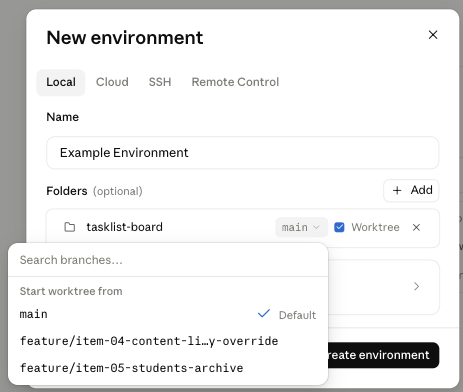
From a running session. The changelog says "Save as environment" at the top of a session saves wherever that session started. That's the version I'd want, since you often only realize a setup is worth keeping after you've used it. I couldn't find the button in my sessions, though, so it may still be rolling out.
Automatically. The first time you open the Code tab with the new layout, Desktop creates up to eight environments for you, based on the local and SSH folders you used most in the last month. If you open the selector and find entries you don't remember making, that's where they came from. Hover and click the gear icon to edit or delete them.
Where they show up
Environments now run through the whole Code tab:
- The New session page has a row under the message box for choosing where Claude runs, plus a card of recent environments. The picker lists local environments first, with keyboard shortcuts (⌥⌘1, ⌥⌘2, and so on), then Cloud and SSH.
- Each session has an Environment card on the new session rail to the right of the conversation, showing the environment it started from, its folder, branch, and Remote Control switch.
- The sidebar can group sessions by environment (Group by > Environment). Sessions with no saved environment fall back to grouping by folder or repository.
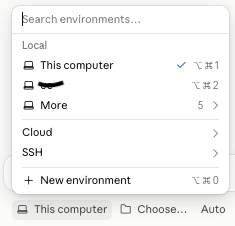
A couple of rough edges
The docs and the changelog don't quite agree on timing. The docs say saved local and SSH environments need Desktop v2.37337.0 or later, while the changelog announces them in v2.42304.0. My guess is a staged rollout, with the feature in the code before it was turned on for everyone. If your selector still sits above the prompt box, you have what the docs call the earlier layout, and updating should fix it.
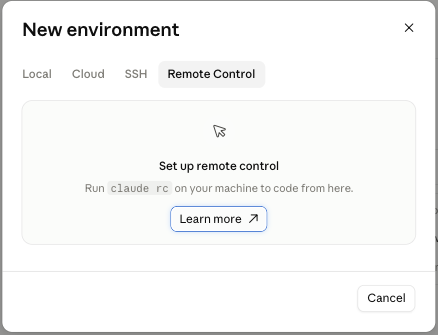
Remote Control is the odd one out. The changelog says you can save a Remote Control machine, but the Remote Control tab has no form to fill in. It tells you to run claude rc on the machine you want to code from, with a link to the Remote Control docs. Wmedia's walkthrough describes the same thing. My read is that the machine appears in the picker once it's connected, rather than being something you set up from Desktop.
My take
It's a handy shortcut. Most of my sessions start with a client task, and an environment means I'm not digging for the right folder before I can describe the work. I'm still deciding whether I want one environment per repo or one per client. Per repo keeps the worktree setting exact, and per client matches how my work actually arrives.
I'd be careful with the environment variables. Variables on a shared environment are shared, and the app even shows a message telling you not to put secrets in them. That's probably fine if you work solo or in a silo, but on a team I'd keep keys somewhere else.
Sources
- Claude Desktop changelog (v2.42304.0 and v2.31226.0)
- Claude Code docs: Desktop application
- AlphaSignal: Anthropic's Claude Code now runs nested sessions and saves dev environments (October 14, 2026)
- Wmedia: Claude Code Desktop environments (October 14, 2026)