Nested sessions turn one Claude Code session into a switchboard
In this post
The Claude desktop app can now hand a task to a whole new Claude Code session that lives under the one you're in. Anthropic calls these nested sessions. The parent can message its children, the children report back, and each child is a full session you can open and talk to yourself. That last part is what makes them different from subagents. It means I can use one session as an orchestration layer and still stay in the loop on every task it spins off.
I found this by accident. A suggested task showed up in a conversation, I clicked it, and instead of the usual worktree session I got a child session tucked under the parent in the sidebar.
What shipped
Nested sessions arrived in Claude Desktop v2.42304.0 on October 15, 2026, which bundles Claude Code 2.1.299. The release note says Claude "can start a task in a separate session, which appears under the original session in the sidebar and reports back to it." AlphaSignal's writeup from the day before describes the same thing: a parent splits work into child sessions, and each child "reports the result to the parent when finished."
A few details from the release notes:
- It works in local and SSH sessions in the desktop app's Code tab. Cloud sessions don't get it, and neither do third-party deployments yet.
- Suggested tasks now appear inline in the conversation instead of above the message box.
- Settings > Claude Code has a new option for what happens when you ask for something unrelated to the current task.
How it works
Suggested tasks aren't new. The desktop docs describe them as task chips. When Claude notices something worth fixing that's out of scope, it offers the work as a chip, and clicking it starts the work in a new session "with its own worktree" while Claude carries on in the current one. A worktree is a separate git checkout of the same repo, so two sessions can edit files without stepping on each other.
What's new is where that session goes and what it can do once it's there. Clicking "create a new session, do it there" opens an options box where you choose:
- whether to use a worktree (the docs only mention worktrees, but you can switch it off and run in the parent's folder)
- the model
- the effort level
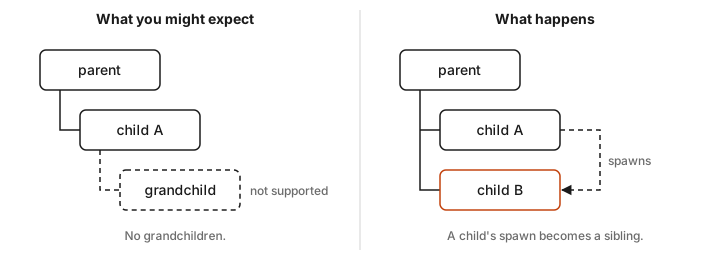
The session that starts sits under its parent in the sidebar. If it outgrows that spot, you can detach it and promote it to a top-level session. Nesting only goes one level deep for now. When a child tries to spawn its own task, the new session shows up as a sibling, not a grandchild.
You don't have to wait for Claude to notice something, either. You can ask the parent to suggest tasks, and it'll lay out a set of cards that you can accept one at a time or all at once. I haven't hit a limit on how many children a parent can have. Yesterday I had one session with six nested tasks under it.
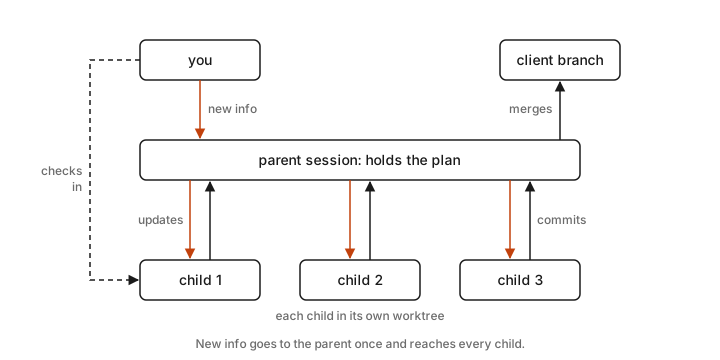
That session was for one client with several asks. The parent held the direction and did the orchestration. Each nested session took one piece of the work in its own worktree, and the parent merged the commits from each child. I could check in on any child's progress whenever I wanted. When something new came up mid-task, I told the parent, and it passed the update to all six children at once.
The parent can talk to its children
The parent-to-child link runs on cross-session messaging, which has been in Claude Code since v2.1.224. Claude finds sessions with a ListAgents tool and sends with SendMessage. You don't call either one yourself. You just say "tell the payments session the schema changed" and Claude writes the message.
A few things from the docs that matter in practice:
- Replies work both ways. The receiving Claude can answer, and the answer comes back to the sender.
- Nothing is interrupted. If the receiving session is mid-task, the message waits until the current work finishes. If it's idle, the message starts a new turn.
- Messages carry no authority. A message from another session can't approve a permission prompt or change settings. Each session keeps its own permissions.
- It's plain text. A message is text that one Claude writes to another. It never includes the sender's conversation history or files.
There's also an idle notice. The parent can ask a child to send a single notice when it next goes idle, which is handy for a long migration or test run. And the desktop app lets Claude list, read, rename, and archive your other Code tab sessions, so the parent can tidy up children whose PRs have merged.
How this differs from the other ways to run agents
Claude Code now has a lot of ways to run work in parallel. The docs' comparison page lists five of them, and that's before nested sessions. I covered one of them, dynamic workflows, last week. Here's where nested sessions fit:
| Who coordinates | Can you talk to a worker directly? | Isolation | |
|---|---|---|---|
| Subagents | Claude, inside one session | No, they return a summary | Own context, optional worktree |
| Agent teams | A lead session, using a shared task list | Yes | No worktrees, so you split up the files |
| Agent view | You | Yes | Its own worktree before it edits |
| Nested sessions | The parent session, with you approving each spawn | Yes, each one is a full session | Worktree or the parent's folder, your choice |
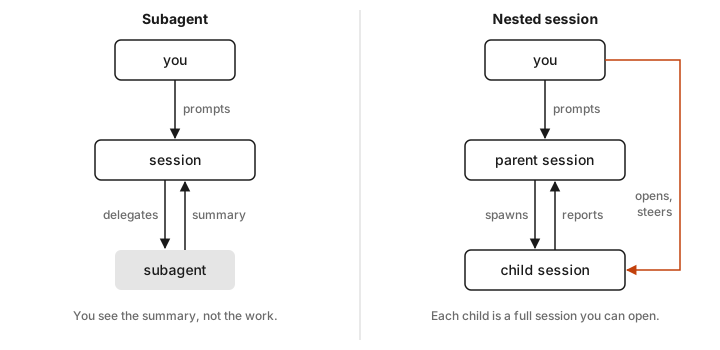
Subagents are the closest comparison. Both are delegated work that reports back. The difference is that a subagent is a black box that hands back a summary, while a nested session is a real session with its own history. I can open it, read what it did, correct it, and send it back to work. It's a subagent I can manage. Agent teams are still experimental and off by default, and they lean toward Claude running the show. Nested sessions keep me as the one who says yes to each task.
What I use them for
My main use is complex work where I need to stay in the loop on each item. The parent holds the overall plan and acts as the orchestration layer. Each item becomes a nested session that I can check, steer, and approve on its own. That keeps the parent's context focused on coordination instead of filling up with the details of six different tasks. Sometimes I open a child and redirect it while it's running. Sometimes the parent reviews a child's result before I approve it. I'm sure there are plenty of other ways to set it up.
Setting up the orchestrator pattern
Here's how I'd set up the version from my client session. The prompts are examples, so word them however you like.
- Start the parent in the project folder on the branch you want the work to land on. The parent does the merging, so it should sit where the merges go.
- Give it the whole job and ask for tasks. Something like "Here are the client's asks. Break them into separate pieces of work and suggest a task for each."
- Accept the cards, all at once or one by one. Turn the worktree on for any child that might touch the same files as another, and pick a model and effort level per task.
- When something changes, tell the parent, not each child. "The client wants the banner in blue now. Let every task that touches the header know."
- As children finish, have the parent review and merge. "Child 2 reported back. Check its commits and merge them if they look right."
- Clean up. Ask the parent to archive the finished children. You'll get an approval card first unless you're in Auto or Bypass permissions mode.
There's also a setting for this. In Settings > Claude Code, you can choose what happens when you ask for a task unrelated to the current one.
Some other uses that fit well:
- The out-of-scope fix. This is the original purpose of suggested tasks. Claude spots a bug that has nothing to do with the current work, and you send it off to a child session instead of derailing the conversation.
- Clearing a backlog. Paste in a list of small issues, ask the parent to suggest a task for each one, and accept them all at once.
- Matching the model to the job. Since each child gets its own model and effort setting, routine chores can run on a cheaper model at low effort while the hard task gets the big one.
- Long-running jobs. Put a migration or a slow test suite in a child and have the parent ask to be told when it goes idle.
- Trying two approaches. Spin off two children in separate worktrees, each with a different approach, and compare them.
Costs and rough edges
Every child is a full session, so the tokens add up. The docs say plainly that "running several sessions or subagents at once multiplies token usage," and every delivered cross-session message counts toward usage like a prompt you typed. Six children means six sessions' worth of usage.
The messaging also has limits. Messages are plain text, a single message to a session on the same machine is capped at about a million characters, and a receiving session queues at most 50 messages. Those limits mostly exist to stop two sessions from messaging each other in a loop.
I haven't hit a real problem yet. The only awkward part was the first time, which went roughly "huh?" then "oh, cool," and then a while of wondering how to make the most of it.
My take
This is the multi-agent setup I've wanted. Subagents are great when I don't care how the work gets done. Agent teams and workflows are great when I want Claude to run the whole thing. Most of my real work sits in between. I want help splitting it up and keeping track of it, but I want to make the call on each piece. Nested sessions handle that middle ground, and since they show up as chips you can click, there's almost nothing to learn.
If you're on the desktop app, update it, then ask your next session to suggest tasks for whatever you're working on. Turn off the worktree for small tasks in the same folder and keep it on for anything that edits the same files as the parent.
Sources
- Claude Desktop release notes, v2.42304.0 (October 15, 2026) and v2.31226.0 (October 8, 2026)
- Use Claude Code Desktop, Claude Code docs
- Message your other Claude Code sessions, Claude Code docs
- Run agents in parallel, Claude Code docs
- Anthropic's Claude Code now runs nested sessions and saves dev environments, AlphaSignal, October 14, 2026
- My own use of the Claude desktop app, October 2026