Dynamic workflows in Claude Code move the plan out of the context window
In this post
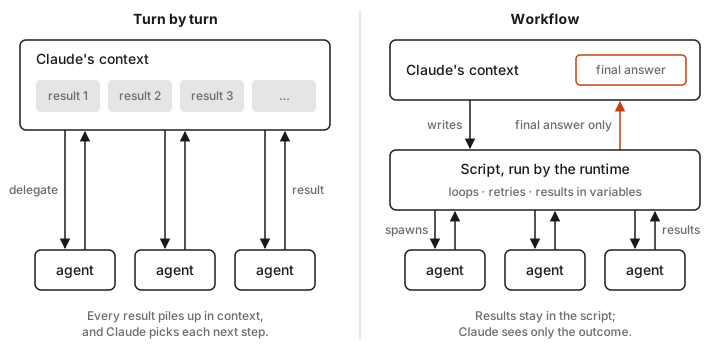
Dynamic workflows are simply the most interesting change to Claude Code this year. Claude stops being the orchestrator and starts writing one. Instead of juggling subagents turn by turn, Claude writes a short JavaScript program, a runtime runs it in the background, and only the final answer comes back into the conversation. That makes big agent jobs something you can read, rerun, and resume, like ordinary code.
I found them by accident. I manage a lot of projects, and I'd asked Claude to go through all their project directories, audit each CLAUDE.md file, and bring them in line with one standard (limits and formatting to save tokens), while keeping whatever was unique to each project. Then the background tasks window popped open and a couple dozen agents were working at once, each project going through its own audit, rewrite, and verify phases. It was amazing to watch, so I went and figured out what had just happened.
Every multi-agent setup eventually hits the same wall. The orchestrator is itself an LLM conversation. Each subagent result lands in its context, every "what next?" decision costs a turn, and somewhere around a few dozen delegations the coordinator starts losing the thread.
Workflows shipped as a research preview on May 28, 2026 and are now generally available. Loops, branching, retries, and intermediate results live in script variables, not in Claude's context.
Below, I cover how to trigger one, what the script looks like, how resume and caching work, what it costs, and where I think it does and doesn't fit.
Where workflows sit
Claude Code now has several ways to run work in parallel. The distinction I find most useful, and the one the docs draw, is who holds the plan:
| Subagents | Skills | Agent teams | Workflows | |
|---|---|---|---|---|
| Who decides what runs next | Claude, turn by turn | Claude, following a prompt | A lead agent, turn by turn | The script |
| Where intermediate results live | Claude's context | Claude's context | Shared task list | Script variables |
| What's repeatable | Worker definition | Instructions | Team definition | The orchestration itself |
| Typical scale | A few tasks per turn | Same as subagents | A handful of peers | Dozens to hundreds of agents |
| On interruption | Turn restarts | Turn restarts | Teammates keep going | Resumable in-session |
The last two rows are the ones that matter. Because the plan is code, it's deterministic, diffable, rerunnable, and checkpointable. That also means quality patterns like fan-out-then-verify, adversarial review, and judge panels get baked into the script, instead of hoping the model remembers them on turn 40.
How to start one
There are five ways in.
The keyword, per task. Put ultracode anywhere in your prompt, or just ask in plain English ("use a workflow"). Claude Code highlights the keyword, and Claude writes a script instead of working turn by turn.
ultracode: audit every API endpoint under src/routes/ for missing auth checks
Changed your mind? Option+W (macOS) or Alt+W (Windows/Linux) dismisses the highlight for that prompt, and you can turn the keyword off entirely in /config.
Ultracode, per session. /effort ultracode tells Claude to plan a workflow for every substantive task, so one request can become a chain of workflows: one to understand the code, one to change it, and one to verify. Start a session this way with claude --effort ultracode (which also sets effort to xhigh), persist it with the ultracode setting, and turn it off with /effort ultracode off. Ultracode is a toggle, not an effort level. It needs a model that supports xhigh, and it disappears if workflows are disabled (model config docs).
The bundled workflow. /deep-research <question> fans out web searches across several angles, cross-checks the sources, votes on each claim, and returns a cited report with refuted claims removed. Claims the verifiers couldn't check (rate limits, API errors) are listed as unverified rather than counted as false. It's the fastest way to watch the machinery run.
I've only used it briefly, and it's pretty great. For some subjects it's heavier than the question needs, so it depends on what you're researching.
Saved workflows. When a run does what you wanted, open /workflows, select it, and press s. It becomes a /<name> command, saved to .claude/workflows/ (shared through the repo) or ~/.claude/workflows/ (personal). Saved workflows take input through an args global, so Run /triage-issues on 1024, 1025, and 1030 passes a real array. No string parsing.
Plugins. Drop scripts in a plugin's workflows/ directory and they ship namespaced. A release-audit workflow in plugin acme-tools runs as /acme-tools:release-audit.
Upgrade if you run Claude Code on untrusted text
As of v2.1.210, the ultracode keyword only counts when you typed it, whether at the interactive prompt, in an IDE panel, through Remote Control, or in an SDK app that marks input as human. It no longer triggers from -p prompts, scheduled tasks, webhook payloads, or PR comments relayed into the session. Before that version, a PR comment containing the word could launch a fan-out. If you point Claude Code at text other people write, upgrade.
What the script looks like
You'll rarely write these by hand, but you should be able to read one. Here's a sketch of a fix-until-green loop using the primitives the docs describe:
export const meta = {
  name: 'fix-types',
  description: 'Run tsc and fix errors until clean or stalled',
}

let stalls = 0
let lastCount = Infinity

while (stalls < 2) {
  phase('Check')
  const report = await agent('Run `npx tsc --noEmit` and list every error by file.', {
    schema: {
      type: 'object',
      required: ['errors'],
      properties: {
        errors: {
          type: 'array',
          items: {
            type: 'object',
            required: ['file', 'message'],
            properties: { file: { type: 'string' }, message: { type: 'string' } },
          },
        },
      },
    },
  })

  if (report.errors.length === 0) return 'Type check passes.'
  stalls = report.errors.length >= lastCount ? stalls + 1 : 0
  lastCount = report.errors.length

  phase('Fix')
  const byFile = Object.groupBy(report.errors, e => e.file)
  await pipeline(Object.keys(byFile), file =>
    agent(`Fix these type errors in ${file}:\n${byFile[file].map(e => e.message).join('\n')}`, { label: file }),
  )
}

return `Stopped: no progress for two rounds (${lastCount} errors remain).`
The API is small:
agent(prompt, opts)spawns one subagent. Pass a JSONschemaand you get validated JSON back instead of prose. Failing outputs are retried (five attempts by default, tunable withMAX_STRUCTURED_OUTPUT_RETRIES), and self-contradictory schemas are rejected before the agent starts.pipeline(items, fn)runs one agent per item.parallel(...)runs a set and waits for all of them.phase(title)groups agents in the progress view, andlog()prints above the phases.- A stopped or failed agent resolves to
null, which is why scripts tend to end with.filter(Boolean).
The constraints are deliberate, and I think they're the right ones:
- No filesystem or shell in the script. Agents do the work; the script only coordinates.
- No
import(). Library work happens inside an agent's task. - No nondeterminism.
Date.now(),Math.random(), and a barenew Date()throw, so pass timestamps in throughargs. This is what lets resume replay the sameagent()calls. - No mid-run user input. If you need to sign off between stages, make each stage its own workflow.
Runtime behavior worth knowing
Concurrency and caps. Up to 16 agents run at once by default (fewer on CPU-limited machines), adjustable from 1 to 256 with CLAUDE_CODE_WORKFLOW_MAX_CONCURRENT_AGENTS. A single parallel() or pipeline() call takes at most 4,096 items and errors past that rather than silently truncating. A whole run is capped at 1,000 agents to stop runaway loops.
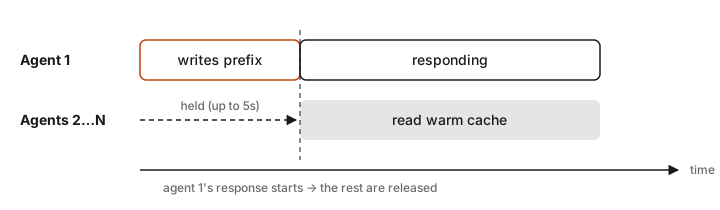
Shared prompt cache. Agents with the same model, effort, agent type, tools, schema, and working directory build the same prompt prefix. In a fan-out, the runtime holds back all but the first matching agent until its response starts (up to 5 seconds, set by CLAUDE_CODE_WORKFLOW_PREFIX_STAGGER_MS), then releases the rest so they read a warm cache instead of each paying for the prefix. Workflow agents get a 5-minute cache TTL by default. For long runs, set subagentPromptCacheTtl to 1h and accept the higher write rate.
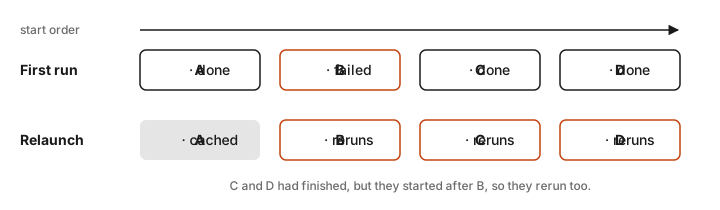
Resume is replay. Relaunching a stopped run replays agents in the order they started. Completed agents return saved results, up to the first agent whose prompt differs from the previous run; after that, everything reruns. A failed agent reruns along with every agent that started after it, even completed ones. So if A, B, C, and D start in order and B fails, a relaunch reuses A and reruns B, C, and D. Design long fan-outs so failures are absorbed (inside pipeline(), a failure becomes null and the run continues) rather than awaited directly, which ends the run.
Stalls fix themselves. An agent that goes quiet too long restarts from the same prompt, up to five times. Files it already changed stay changed. Lengthen the window per agent with stallMs, or globally with CLAUDE_ASYNC_AGENT_STALL_TIMEOUT_MS.
Usage limits pause the run instead of failing it. On an interactive subscription session (v2.1.271+), agents that hit your usage limit wait for the reset and the run carries on. There are limits to that. Resets more than 24 hours out, and a third limit hit, still fail the agent.
The script is a file, at least according to the docs. Every run writes its script under ~/.claude/projects/, where you can read it, diff it against the last run, edit it, and ask Claude to relaunch from your edit. I went looking for mine and couldn't find it, so I can't vouch for that part yet. Saving a run from /workflows as a reusable command works, and that's the part I care about.
Watching and steering a run
/workflows lists runs and opens a progress view with per-phase agent counts and live token usage. Open any agent to see its prompt, recent tool calls, and result. The keys you'll use: p pauses and resumes, x stops an agent or the whole run, r restarts a running agent, f filters by status, and s saves the script as a command. A one-line summary also sits in the task panel under the input box.
Permissions
How a launch gets approved depends on your permission mode:
- In auto mode, you're asked on the first launch only, and not at all with ultracode on. Anthropic recommends auto mode for workflows.
- In manual or accept-edits mode, you're asked every run, with the planned phases shown and an option to view the raw script (
Ctrl+Gopens it in your editor). Bundled, saved, and plugin workflows can be set to "don't ask again" per project. claude -pand the Agent SDK never prompt, because theWorkflowtool goes through normal permission evaluation. AllowWorkflow(all) orWorkflow(<name>)(one saved workflow), or approve through auto mode, aPreToolUsehook, orcanUseTool.
The agents themselves get no special treatment. They follow the same permission rules and the same sandboxing. To keep a long run from stalling on prompts, add the tools it needs to your allow rules before you start. One subtle point: in auto mode, prompts a script passes to agent() are marked as script-computed, so the classifier doesn't treat them as instructions from you.
Cost is the part to take seriously
Workflows burn a lot more tokens than doing the same task in conversation, and on a subscription that counts against your limits. The guardrails:
- A "Large workflow" warning appears when a run schedules more than 25 agents or projects past 1.5M tokens. It's advisory and doesn't stop anything.
- A size guideline (
workflowSizeGuidelineor/config) nudges how many agents Claude plans:small(under 5),medium(under 10, the default),large(under 50), orunrestricted. Pro defaults tosmallon v2.1.271+. It's advice to Claude, not a hard cap. - You can pick the model per stage. Agents default to your session model; ask Claude to put mechanical stages on a smaller one, or set
CLAUDE_CODE_SUBAGENT_MODEL. - Pilot on a slice. Run it on one directory first, watch the token column in
/workflows, then scale up.
Ultracode deliberately removes the large-run warning and the concurrent-subagent limit, because turning it on counts as consent to big runs. I'd leave it off for routine work.
For a sense of scale, my CLAUDE.md audit took my session usage on the Pro plan from about 11% to 48%. I knew it would cost something, and the amount still surprised me a little. It didn't come close to my weekly limit, and it was completely worth it.
The big case study is Bun's move from Zig to Rust
The launch post's showcase was Jarred Sumner's port of Bun from Zig to Rust. It produced roughly 750,000 lines of Rust, passed 99.8% of the existing test suite, and took eleven days from first commit to merge. It's a chain of workflows with one job each. One mapped the correct Rust lifetime for every struct field. The next ported each .zig file to a behavior-identical .rs file, using hundreds of agents and two reviewers per file. A fix loop then drove the build and tests until both were clean. An overnight workflow afterward hunted for unnecessary copies and opened a PR per fix.
Sumner's own write-up, via Simon Willison, and later coverage fill in the details: around 50 workflows over the 11 days, a PORTING.md mapping Zig idioms to Rust plus a lifetimes table as the key inputs, and a peak of four concurrent workflows at 16 agents each, which is 64 agents in parallel across separate worktrees. He describes watching the runs, reading outputs, and having Claude adjust the loops as problems surfaced. Claude Code itself has shipped on the Rust build of Bun since v2.1.181.
It isn't an uncontested success. The Register reported the run cost about $165,000 at API pricing. InfoQ noted the mechanical translation introduced 19 subtle regressions, where Zig and Rust code looked alike but behaved differently. And Zig creator Andrew Kelley publicly criticized the rewrite, asking how a test suite that missed bugs in Zig would catch them in machine-written Rust. I read the case study as a demonstration of scale, and of how much verification you'll need, not as proof the output is correct.
Other early users reported smaller wins. Klarna's engineering team used workflows to find dead code and cleanup opportunities that static analysis missed, and CyberAgent described them as filling the gap between a single subagent and a full agent team.
When I'd reach for one
Good fits are work that's wide, repetitive, or needs independent checking:
- The same audit across many files (auth checks, input validation, unsafe patterns), with each finding adversarially verified
- Large migrations, with each file transformed in an isolated copy
- Fix-until-green loops on a type checker, linter, or test suite
- Search-until-saturated jobs, like a flaky-test hunt that stops after two rounds find nothing new
- Research where sources need to be checked against each other
- High-stakes plans you want drafted from several angles and compared
Poor fits:
- Small tasks that fit comfortably in one context. You pay the fan-out overhead for nothing.
- Anything that needs your judgment mid-run. Split it into separate workflows instead.
- Work where you can't verify the output. More agents just produce more unverified code, faster.
If you already have orchestration built another way, like a folder of subagent prompts or a skill that fans out, you can point Claude at it and ask for an equivalent workflow.
Availability and off switches
Workflows need Claude Code v2.1.154+ and are available on Pro, Max, Team, and Enterprise, through the Anthropic API, and on Amazon Bedrock, Google Cloud, and Microsoft Foundry. They're on by default except on Pro, where you turn on the Dynamic workflows row in /config. They run in the CLI, the Desktop app (progress shows in the Background tasks pane), IDE extensions, claude -p, and the Agent SDK.
To turn them off, use the toggle in /config, set "disableWorkflows": true, or export CLAUDE_CODE_DISABLE_WORKFLOWS=1. Admins can enforce the same through managed settings or the Claude Code admin page. Disabling workflows also removes ultracode and /deep-research.
My take
Orchestration moved out of a model's turn-by-turn judgment and into a program the model writes, which you can read, edit, rerun, save, and resume. That makes agent work at codebase scale look a lot more like normal engineering: a script, a progress view, a cost meter, and a verification step you can inspect.
If you want to try it, start with /deep-research to watch it run, then try ultracode: on one scoped audit, and save the first workflow that earns its tokens.
Sources
- Orchestrate subagents at scale with dynamic workflows (Claude Code docs)
- Introducing dynamic workflows in Claude Code (Claude blog)
- Run agents in parallel (Claude Code docs)
- Model configuration, effort, and ultracode (Claude Code docs)
- Rewriting Bun in Rust (Simon Willison)
- Bun rewrites 535K lines of Zig into Rust (InfoQ)
- Zig creator calls Bun's Claude Rust rewrite 'unreviewed slop' (The Register)
- Bun Rust rewrite coverage (36Kr)