/loop, -p, the Agent SDK, and background sessions, untangled
In this post
/loop, -p, the Agent SDK, and background sessions are four ways to run Claude Code without typing every message yourself. /loop repeats a prompt inside a session you already have open. -p runs a single prompt and exits, so it's the one for scripts. The Agent SDK is that same engine as a Python or TypeScript library. A background session is a normal Claude Code chat that keeps going after you close the terminal.
The Claude Code docs group all four under one heading on the sessions page, and what they share is narrow. The session picker and claude --continue handle each of them differently from a normal chat. If you're new, that heading makes them look like one feature, or at least four related ones. They're not. I keep explaining the difference to people who are new to Claude Code, so here it is written down once.
Short version
| What it is | Is it a chat you can reply to? | How you start it | |
|---|---|---|---|
/loop |
A prompt that re-runs on a timer inside your session | Yes, it's your current session | /loop 5m check the deploy |
-p |
One prompt, one answer, then exit | No, it prints and quits | claude -p "what does auth.py do?" |
| Agent SDK | -p's engine as a library in your own code |
Only if your code builds that | npm install @anthropic-ai/claude-agent-sdk |
| Background session | A full chat with no terminal attached | Yes, attach or reply anytime | claude --bg "fix the flaky test" |
/loop repeats a prompt in your session
/loop re-runs a prompt in the session you're already in. It's for waiting on something, like a deploy finishing, CI going green, or review comments landing on a PR. It arrived in Claude Code 2.1.71 in March 2026.
What you pass decides how it behaves:
/loop 5m check if the deployment finished    # fixed interval
/loop check whether CI passed                 # Claude picks the interval
/loop                                         # built-in maintenance prompt
With an interval, it runs on a schedule. Units are s, m, h, and d, and anything under a minute rounds up to a minute. Without an interval, Claude picks the wait after each run, somewhere between one minute and one hour depending on what it saw. A bare /loop runs a built-in prompt that keeps working on unfinished tasks and tends the current branch's pull request. You can swap that default for your own instructions in .claude/loop.md.
The limits matter more than the syntax. A loop only fires while the session is open and idle. Close the terminal and it stops. Recurring loops also delete themselves after seven days, so a forgotten one can't run forever. If you want something that runs on a schedule without a session open, the docs point you to cloud routines or Desktop scheduled tasks instead.
To stop a fixed-interval loop, ask Claude to cancel it. Esc only stops the self-paced kind.
-p runs one prompt, then exits
-p (short for --print) runs Claude Code without the chat interface. You hand it a prompt, it does the work, prints the result, and exits. The docs used to call this "headless mode" and now call it non-interactive mode.
claude -p "Find and fix the bug in auth.py" --allowedTools "Read,Edit,Bash"
This is the one for scripts, git hooks, and CI. It exits with code 0 on success and non-zero on failure, so a script can branch on the result. Add --output-format json and you get machine-readable output, including a session ID.
A -p run isn't a dead end. It's saved like any other session (unless you pass --no-session-persistence), so you can keep going:
session_id=$(claude -p "Start a review" --output-format json | jq -r '.session_id')
claude -p "Now focus on the database queries" --resume "$session_id"
I haven't needed -p myself yet.
The Agent SDK is -p as a library
The Agent SDK gives you "the same tools, agent loop, and context management that power Claude Code," but you call it from Python or TypeScript instead of the command line. It was called the Claude Code SDK until version 2.0.0 in September 2025, which is why older blog posts use that name.
npm install @anthropic-ai/claude-agent-sdk   # TypeScript
pip install claude-agent-sdk                 # Python
The SDK runs the Claude Code binary under the hood, and your skills, CLAUDE.md memory, hooks, and MCP servers load the same way they do in the CLI. Use it when you're building something: an internal tool, a bot, a product feature that needs an agent. If you're in a language other than Python or TypeScript, the docs say to shell out to claude -p --output-format json, which is a good hint at how close the two are.
If you build a product on it, Anthropic doesn't let third-party apps offer claude.ai login or subscription rate limits unless they've been approved, so your users need to bring an API key.
Background sessions keep going without a terminal
A background session is a full Claude Code conversation that keeps running when no terminal is attached. You can walk away, open it later, reply, and leave again. This is the newest of the four. The screen that manages them, agent view, landed in 2.1.139 in May 2026 and is still labeled a research preview.
There are three ways in:
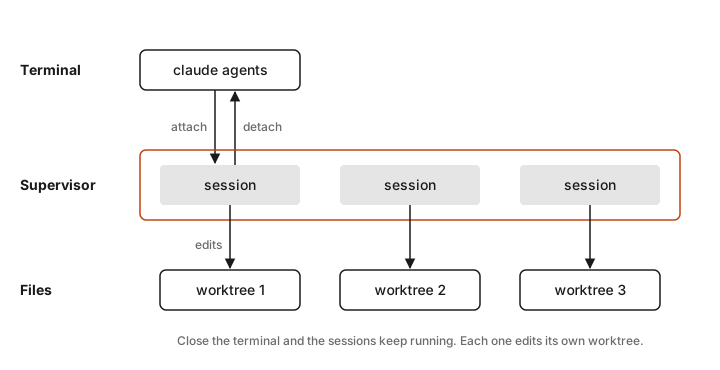
claude --bg "investigate the flaky settings test"starts one straight from your shell/bg(or/background) inside a session you already have open sends it to the backgroundclaude agentsopens agent view, where each prompt you type starts a new background session
Agent view lists every background session and whether it's working, waiting on you, or done. Press Space on a row to peek and reply, or Enter to attach and get the full conversation back.
A few things happen behind the scenes. When you start a session with --bg or from agent view, Claude moves it into its own git worktree before editing anything, so parallel sessions don't overwrite each other's files. A session you sent to the background with /bg keeps editing where it already was. A small supervisor process keeps the sessions alive, and it's local, so they stop if your machine shuts down. Each session also uses your subscription quota on its own, so ten at once burns through it about ten times as fast.
claude -p --bg is an error, which surprises people. It sounds like "run this in the background without a chat," but -p never starts the interactive session that a background session is, so Claude Code refuses before it starts anything. Use claude --bg "prompt" with the prompt as a plain argument.
Background sessions come up a lot for me, and mostly Claude starts them, not me. I've tried agent view with limited success. It sounds cool, but I don't find it that easy to make sense of. I like nested sessions in the desktop app a lot, but they're a different tool for a different job.
Why some sessions don't show up when you resume
Back to that docs heading. When you run claude --resume or claude --continue, Claude Code is looking for conversations you had. It deliberately skips the ones that weren't conversations in that sense:
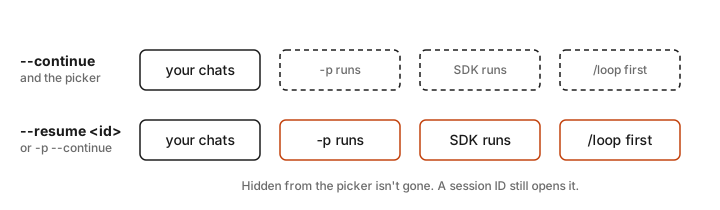
- Sessions started with
-por the Agent SDK are left out of the picker and out of--continue. - Sessions whose first prompt was
/loopare left out too. Running/looplater in a normal chat doesn't hide it. --continueopens a background session that's finished, but not one that's still running. For a running one, attach fromclaude agents.
None of these are lost. You can open any of them with claude --resume <session-id>, and claude -p --continue does include -p, SDK, and /loop sessions. The logic makes sense once you see it. If your last ten sessions were cron jobs, you'd want --continue to skip them and land on the chat you were actually having.
Which one to start with
If you're new, start with background sessions. You'll run into them anyway, because Claude starts them on its own, so it helps to know what you're looking at and how to attach to one. Next, try /loop the first time you catch yourself asking "is it done yet?" Reach for -p when you want Claude inside a script. Leave the Agent SDK until you're building something other people will use.
Details as of October 2026, Claude Code 2.1.306.
Sources
- Manage sessions, Claude Code docs
- Run prompts on a schedule, Claude Code docs
- Run Claude Code programmatically, Claude Code docs
- Agent SDK overview and quickstart, Claude Code docs
- Manage multiple agents with agent view, Claude Code docs
- Glossary, Claude Code docs
- Claude Code changelog, versions 2.0.0, 2.1.71, and 2.1.139
- @anthropic-ai/claude-code release dates, npm registry