Claude Code is also an MCP server. What!?
In this post
Claude Code can run as an MCP server. One command, claude mcp serve, lets any app that speaks MCP (Claude Desktop, Cursor, or a script you write) use Claude Code's tools: reading and editing files, running shell commands, searching the web, and, as of a few weeks ago, handing off a whole task to a Claude Code agent. It also does no permission checks of its own, so the app on the other end has to be the one that asks before anything runs.
I stumbled on this in the Claude Code MCP docs and had no idea what to do with it. So I poked at it until I did.
Flipping the usual direction
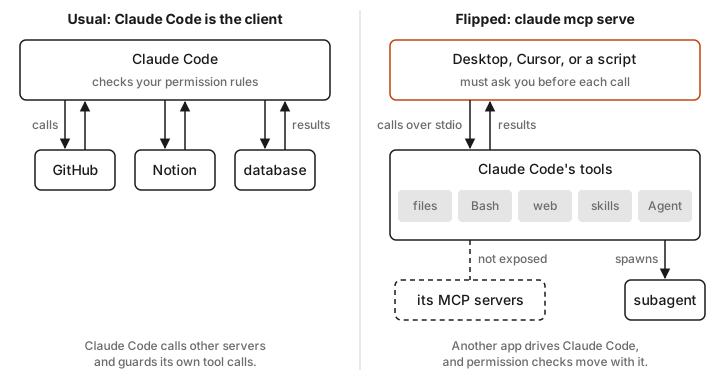
MCP (Model Context Protocol) is the standard way AI apps connect to outside tools. Usually Claude Code is the client. You add a server, say for GitHub or a database, and Claude Code calls its tools.
claude mcp serve turns that around. Claude Code becomes the server, and some other app is the client. That app gets Claude Code's toolbox without having to build its own file editor or shell runner.
Setting it up
Start it like this:
claude mcp serve
Nothing happens. No banner, no prompt, just a terminal that looks frozen. That's correct. The docs explain that a stdio server talks over standard input and output, so it sits there waiting for a client to connect. You won't normally run it by hand anyway. The client app starts it for you.
For Claude Desktop, add this to claude_desktop_config.json:
{
  "mcpServers": {
    "claude-code": {
      "type": "stdio",
      "command": "claude",
      "args": ["mcp", "serve"],
      "env": {}
    }
  }
}
If Desktop can't find claude on its PATH, you'll get spawn claude ENOENT. Run which claude and put the full path in command instead.
The server runs in whatever directory the client launches it from. In my test, pwd returned the folder I started it in, and every file path is relative to that.
What it actually exposes
The docs say it exposes "Claude Code's tools" without listing them, so I asked it directly. A few lines of Python can speak MCP to it:
import subprocess, json

p = subprocess.Popen(["claude", "mcp", "serve"], stdin=subprocess.PIPE,
                     stdout=subprocess.PIPE, text=True)

def send(msg):
    p.stdin.write(json.dumps(msg) + "\n")
    p.stdin.flush()

send({"jsonrpc": "2.0", "id": 1, "method": "initialize",
      "params": {"protocolVersion": "2025-06-18", "capabilities": {},
                 "clientInfo": {"name": "probe", "version": "0"}}})
p.stdout.readline()
send({"jsonrpc": "2.0", "method": "notifications/initialized"})
send({"jsonrpc": "2.0", "id": 2, "method": "tools/list"})

for tool in json.loads(p.stdout.readline())["result"]["tools"]:
    print(tool["name"])
p.kill()
On Claude Code 2.1.296 I got 24 tools back. The ones that matter most:
Read,Write,Edit, andNotebookEditfor filesBashfor shell commandsWebSearchandWebFetchSkill, so a client can run your Claude Code skillsAgent,Workflow, andSendMessagefor delegating work to subagentsCronCreateand friends for scheduling
Your list will differ. Mine included tools tied to my own setup, like Artifact and DesignSync. What it doesn't include is any of the MCP servers Claude Code itself is connected to. My Gmail, Notion, and Figma connectors were nowhere in the list. There's no passthrough, which Kyle Redelinghuys also found.
Why it flew under the radar
For most of its life this was a remote file editor and shell. Useful, but most MCP clients can already get that from a dedicated filesystem server.
The Agent tool is what makes it interesting, and it barely worked until recently. The changelog for 2.1.288 says it "fixed the Agent tool in claude mcp serve always reporting no available agents and rejecting every subagent_type." Before that fix, a client couldn't actually hand Claude Code a task.
Now it can. I sent an Agent call asking a general-purpose subagent to read a file and tell me its contents. It came back in 4.3 seconds, ran on Opus 5.5, and reported using 33,825 tokens for that one tiny job. So a client can say "go refactor this module" and get a full Claude Code agent doing the work.
A couple of other recent fixes point the same way. Version 2.1.271 added a progress update every 30 seconds so long commands don't hit client timeouts. Version 2.1.295 made background Bash results include the output file path. It's getting steady attention, even if it isn't getting announcements.
Be careful with it
The docs say it plainly. The server "only exposes Claude Code's tools to your MCP client, so your own client is responsible for implementing user confirmation for individual tool calls."
I tested how far that goes. My Bash and Read calls ran instantly with no prompt. Then I added a project .claude/settings.json with deny rules for Bash(rm:*) and for reading a file called secret.txt. In my test neither rule stopped anything. The client read the secret and deleted the other file. I only tried this on one machine and one version, so treat it as a warning rather than a spec, but don't count on your Claude Code permissions to protect you here.
So only connect a client that asks you before each tool call, and launch it in a folder you're happy for it to touch.
When I'd use it
Kyle's take is that "this isn't revolutionary for day-to-day coding if your current tools work fine." That's fair. If you already live in Claude Code, you don't need another app driving it.
It earns its place when the other app is where you already are. Claude Desktop can now hand a coding task to a real Claude Code agent. Your own script or agent can borrow Claude Code's tools, and your skills, without rebuilding them.
I don't have a real use for it yet. I mostly wanted to understand it, and I'll keep using Claude Code directly. But now I know it's there.
Sources
- Connect Claude Code to tools via MCP, Claude Code docs
- Claude Code changelog, versions 2.1.271, 2.1.288, and 2.1.295
- Claude Code MCP Server: Complete Setup Guide, Kyle Redelinghuys, October 2025
- Claude Code MCP Server:
claude mcp serveExplained, Oodle - My own tests against Claude Code 2.1.296 on macOS, October 2026