Claude artifacts can talk back to your session
In this post
Artifacts are amazing! An artifact is a page Claude makes for you (a doc, a deck, a design, a dashboard) that you keep, share, and come back to. The part that surprised me most is that an artifact can talk back. Put a button on the page, click it, and the Claude session it's open beside gets the message. Open the same artifact on its own and the button has nobody to talk to.
I got hooked building a dashboard for managing tasks across my Claude sessions. It's part tool and part dashboard, with resources and notes I can edit as I go, and because artifacts can keep data in a database, all of it sticks around between visits. I've also used one to plan the jump from v1 to v2 of an app. Every v1 feature got its own row with a toggle to keep it or skip it, which mattered because v1 was a prototype full of proofs of concept.
I made an example of each type so you can see them instead of reading about them. They're linked as we go.
Five types
As of October 2026 there are five kinds of artifact you can start from, each with its own template. Docs, Slides, and Design left beta on October 8 and are on every plan, Free included. Dashboards and Motion launched the same day in beta.
| Type | What it's for | Plans | Exports |
|---|---|---|---|
| Docs | Writing you edit together with Claude and other people | All, including Free | Word, PDF, Markdown, Google Docs |
| Slides | 16:9 decks to present or download | All, including Free | PowerPoint, PDF, Google Slides |
| Design | Artboards on a canvas: screens, posters, social cards | All, including Free | .zip, PDF, PPTX, HTML, Google Slides |
| Dashboards (beta) | Charts, numbers, and tables, with sources | Pro, Max, Team, Enterprise | None listed |
| Motion (beta) | Animated video | Team, Enterprise | MP4 |
Design looks and feels a lot like Figma: a canvas of artboards you can pan around, comment on, and export. It started life as Claude Design, an Anthropic Labs research preview in April, moved into every conversation in September, and the standalone claude.ai/design site closes on December 14.
I made my design example with one simple prompt, asking Design to show off what Design can do. Panning across artboards, editing components, and leaving comments right on the canvas all feel like Figma.
My examples, all made by Claude from one prompt each:
- A doc: Artifact capabilities cheat sheet
- A deck: Claude artifacts in 7 slides
- A design: emzimmer.com post designs, with a share card, a phone mockup of this post, and a button in three states
- A dashboard: Claude artifact types at a glance
All of them are shared publicly, but they don't all behave the same signed out. The deck and the design open for anyone, the dashboard loads but asks you to sign in to see its data, and the doc needs a Claude account to open at all.
I couldn't make a Motion example because it isn't on my plan. There's also no Sheets type, which I half expected. Spreadsheets only show up through the Google Sheets connector.
You can also skip the templates and have Claude write a plain HTML page. That's what the two talk-back examples below are.
What a page can do
A plain artifact is a web page, so it can do whatever a page can. The interesting part is what Claude adds on top. According to Anthropic's help center and the Claude Code docs, an artifact can:
- call Claude with no API key, with usage counted against the viewer's plan, not yours
- use your connectors (Google Drive, Notion, and so on), running as whoever is viewing
- keep data between visits, up to 20 MB per artifact
- take comments, and in a doc you can mention @Claude to ask for an edit
- in Claude Code, keep every publish as a version you can switch between
In Claude Code these are called capabilities, and a page asks for them by name when it's published. My cheat sheet lists all eleven.
Sharing
Artifacts start private. On Pro and Max you can keep one to yourself or share it with anyone who has the link. Team and Enterprise add "only people invited" and "anyone at your org", and public links stay off until an owner turns on external sharing, per the sharing article.
One rule matters for anything clever. An artifact that uses your connectors or calls Claude can't be shared with "anyone with the link". That makes sense, since it would run on the viewer's account, but it means the most interesting artifacts are the hardest to show off.
Talking back to the session
This is the really cool part. A page can hand data to the Claude conversation it's open beside, using a function called sendToClaudeSession. It isn't in the public docs yet. I found it in the type definitions that ship with Claude Code (runtime contract 0.2.85), and the public artifacts page only suggests a "Copy as prompt" button you paste from.
It works in two modes:
stage(the default) drops the data in your message box as an attachment, and nothing reaches Claude until you send a message of your ownsendshows you what the page wants to send and asks you to confirm, then starts Claude's turn
In my test only stage worked. send failed with claude_unavailable, even though the call ran straight from the click. The definitions say that happens on a browser that can't prove the viewer's click for a send, so for now I'd build buttons that stage.
Either way, the click has to come from you. In the type definitions' own words, "There is no way for a page to start Claude's turn by itself." Claude also gets the data framed as coming from the page, never as your words or as instructions. Those two rules are what make it safe to put a button like this on a page someone else might open.
The code is short. The page asks for the room capability when it's published, then:
const room = await claude.use("room"); // null when this view can't use it

button.addEventListener("click", () => {
  // Call it straight from the click, with nothing awaited first
  room.sendToClaudeSession(
    { label: "Explain this page", request: "explain" },
    { deliver: "stage" }
  );
});
Try it with my talk-back demo. Pick a request, press a button, and watch it land in your conversation.
Why it fails when you open it on its own
When I opened the same artifact by itself from the artifacts panel in the desktop app, the button failed silently. No error, no message. The type definitions explain why. Before sending, a page can call canSendToClaudeSession(), and when no conversation is open beside it, the answer is no_session. The data needs somewhere to go.
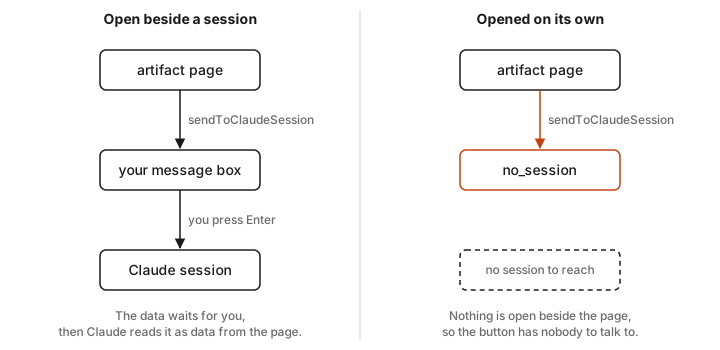
My demo shows the answer live, so you can see which state you're in. If you open it from a public link, you'll see off, because sending to Claude is never offered there. The definitions also list states where the platform will route a "send" to one of your sessions that already has the artifact, or open a new chat for it. I haven't seen those happen myself.
Can a dashboard run all your sessions?
Not yet, at least not on my account. Here's what I tried.
My first idea for reaching a particular session was webhooks. Claude Code's cloud sessions do have one, a tool called watch_url, but its signing secret is sealed so that only the artifact service can use it. It wakes a session when an artifact it watches gets republished, which is useful but isn't a way for your page to call a session. Routines also accept a webhook, and each one starts a brand new session rather than messaging an existing one.
The better route is the connector. Cloud sessions in Claude Code come with a Claude Code Remote connector that can start and steer other sessions, including listing them and sending one a message. An artifact can call your connectors as you. On paper, putting those together lets a page list your sessions and message any of them, one at a time or all at once.
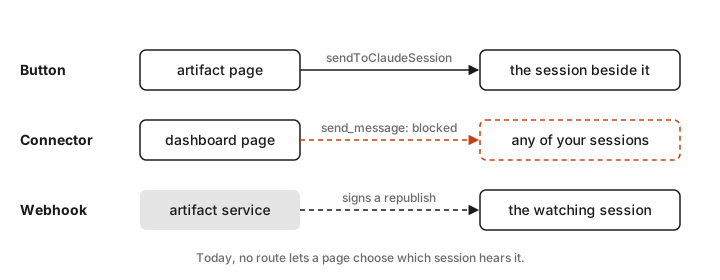
So I built it: a Session Switchboard with a row per session, a message box on each, and a broadcast box for the ones you tick. It never got that far. When I opened it, the connector refused with blocked_by_policy and offered the page no tools at all. The runtime's type definitions describe that code as organization policy blocking the tool for this viewer. The artifact's permissions panel showed both tools allowed, and Claude Code Remote doesn't appear in the connector settings at all, so there was nothing for me to switch on. So for now, at least on my account, an artifact can't message your other sessions. The button beside a session is the only way back in.
My take
Start with persistent data. Ask Claude for a small tracker (tasks, reading list, whatever you'd otherwise keep in a note) that saves its data in the artifact's database. It's the feature my own task dashboard depends on. Once you have one, add a button that sends the current item to Claude, and open it beside a session.
Sources
- Dashboards and Motion launch post, Anthropic, October 8, 2026
- What are artifacts and how do I use them?, Claude Help Center
- Publishing, remixing, and sharing artifacts, Claude Help Center
- Artifacts admin guide for Team and Enterprise plans, Claude Help Center
- Get started with Claude Design, Claude Help Center
- Get started with Claude Docs, Claude Help Center
- Get started with Claude Motion, Claude Help Center
- Introducing Claude Design, Anthropic, April 17, 2026
- Artifacts in Claude Code, Claude Code docs
- Routines, Claude Code docs
- Self-hosted environments configuration, Claude Code docs
- Build and share AI-powered artifacts, Anthropic
- Artifact runtime type definitions (
room.d.ts, contract 0.2.85), bundled with Claude Code 2.1.302